

WOW! I never knew that Android Applications works like this!
Android app development is booming. In fact, Google Play Store has more than 2.9 million apps available! Are you interested in creating an Android app? Before you start, you should understand how it works. This article will explain everything you need to know about Android application development and how these apps work.
The 5 Habits that are killing your Coding Skills are Explained down.
To understand the Workings of Android and its apps we first need to know that all of its Working depends on two Main Computer Languages which are XML for the Frontend (Building the UI and UX of the App) and JAVA/KOTLIN for the Backend and Connectivity (The working of anything depends on the backend which means the clicking of a button and where it would redirect you to depends on this computer language).
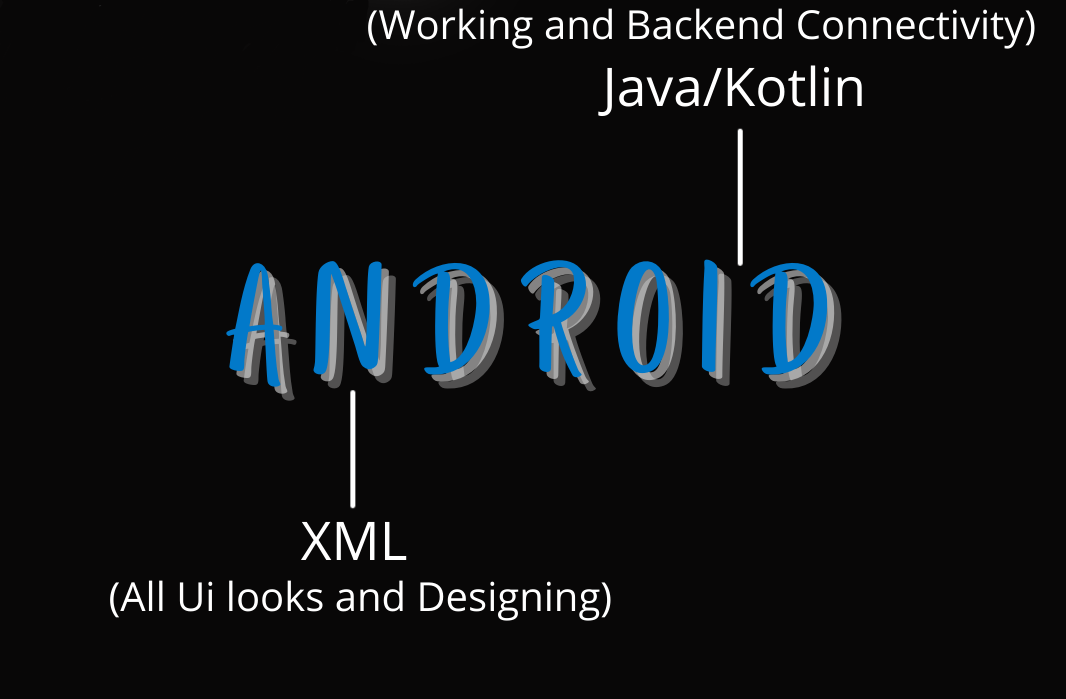
How XML help app to work?
To Create an Android Application We need to Understand our Need and Ui First. Suppose We are Creating an app and We Want it to look Updated and Interactive like this So by Seeing it we know We will use a button in it Textbox's to Enter our Details ot and then Some Background and Our Custom Font.These Things Together will make our UI like This but to create This We will Use XML Code to create it.
What JAVA/KOTLIN do in all this?
As we Created a UI to Intract we need it to work and to make it work We use Java/Kotlin as you see there is a button in our Ui and Textbox's also so that means we ma need the information which user gonna provide to store on a Database so to store it we will use Java as an Intermediator which will connect this UI to other pages or database.
Things you should know before making an Android Application:
1. To Create an Android Application you must know Android Studio, XML, Java, and Database.
2. There are many features available in Android studio (pre-built designs, controllers) which will help to create your design look interactive
3. The Working of your app Depends on Java/Kotlin if it is well written your app will work fine
4. The API of the app can create easily but it is not less important than Java/kotlin.

Popular Posts